NA-R5C Underwater Housing
Technical Specifications:
| Dimensions |
366mm x 232mm x 180mm (W x H x D) |
| Depth Rating |
100m |
| Weight in air |
4.3kg |
| Weight in water |
0.3kg (includes camera, LP-E6N battery and 20,000 mAh power bank |
| Port Opening |
N120 Cinema |
split
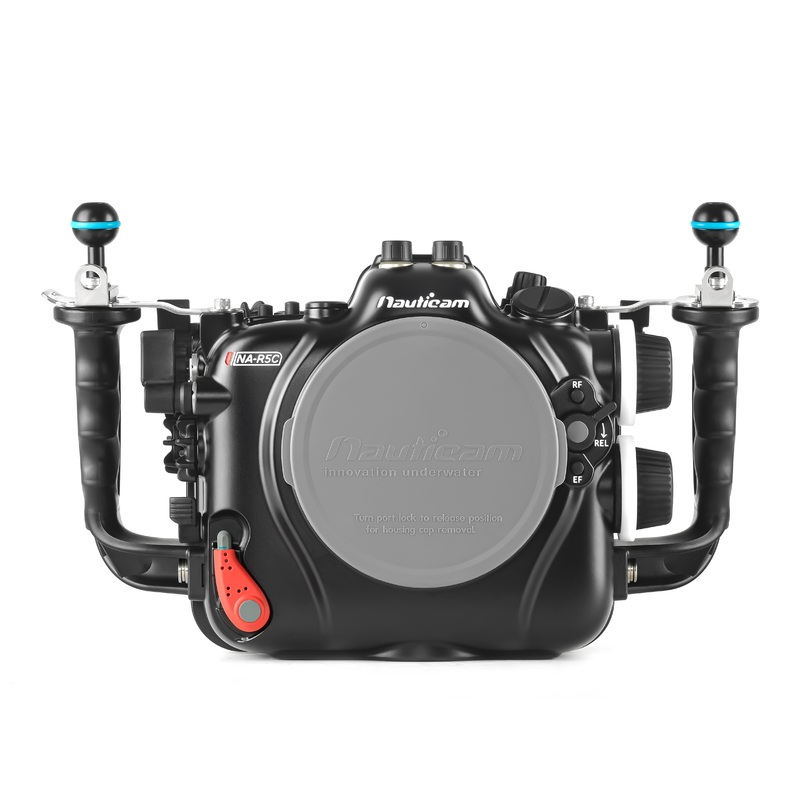
The Nauticam NA-R5C Underwater Housing for the Canon EOS R5 C Camera
The NA-R5C underwater housing follows suit withNauticam’s drive for innovation.The Canon R5 Cpresents shooters with the ability to use both the available legacy EF lenses via an adapter in addition to their native RF optics. To support both the legacy and native lenses, Nauticam has integrated the NA-R5C into the N120 port system. Canon’s EF to RF mount adapters can be affixed to the camera before insertion into the housing. When using the EOS R5 C inside the housing with the adapter and a supported EF lens, the port and extension ring arrangement will be identical to the same setup on a Nauticam Canon N120 Cinema EF MountPort Chart. As the RF lens lineup continues to emerge, more dedicated port and extension ring combinations will be listed on the Port Chart. Two lens release buttons, one for RF and one for EF lenses used with the optional Canon adapter, are located on the front of the housing to make lens removal through the port opening simple.
Mission Control
Nauticam engineers areobsessedwith getting the underwater image maker unfettered access to all the necessary controls, with as many within easy reach of the ergonomic rubberized handles. This Mission Control philosophy extends to the NA-R5 C where a dual thumb lever and dual sub-lever are placed by the right handle. The upper thumb lever activates the “AF-On” and the lower the “Menu” or “Q” buttons while the sub-lever corresponds to the “M-Fn” and “Record” buttons. Near the left handle is a thumb lever for “Playback” as well as a dedicated switch to change from using LCD to the EVF.
Large knurled and rubberized control dials access the camera’s “main” and “sub” command dials. The two-stage trigger allows for smooth focus and firing activation. Additional buttons for “Menu”, “Focus Point Selection” and others are also easily reached from the handles.
An optional 16703 Control Kit for the NA-R5C is available to use with the Drop-In Filter Mount Adapter EF-EOS R. You can access the Canon Control Ring and Drop-In Filter Mount Adapter from the top left side (ADAP FN knob).
External Battery Pack
To support 8K 60p internal Canon Cinema RAW Light recording, an external power source is required. At the bottom of the housing is space to accomodate a USB-C power bank. Here are two known compatible batteries with more to come:
- Anker PowerCore III 19,200mAh Huge Cell Capacity 45W Power Delivery Portable Charger (Dimensions: 169x79x22.4mm)
- ZMI 20000mah 65W PD battery (Dimensions: 160.4×81.8×21.5mm)
Flash Triggering
Flash triggering is achieved via one of two optional Flash Triggers, a manual LED trigger (PN 26301) or a TTL Flash Trigger (PN 26321) that use the built-in fiber optic bulkheads with optional fiber-optic cables to trigger supported strobes. For controlling strobes that do not support fiber optic flash triggering, a variety of legacy hot-shoe flash control bulkheads are available.
Integrated Vacuum Check and Leak Detection System
THE CANON R5C FOR UNDERWATER FILMMAKING, IS IT TOO GOOD TO BE TRUE?
What if I told you there was an entire cinema camera and underwater housing package that not only offered 8K 60p internal 12-bit raw recording with no overheating, great autofocus, excellent color, but was also a fully functional full-frame 45-megapixel stills camera as well? Sounds way too good to be true, right?
HOW LONG CAN YOU SHOOT VIDEO WITH THE CANON R5C?
Nauticam engineered a special battery compartment along the bottom of the housing for this exact reason that supports usb c power banks. This ANKER powercore elite 3 battery pack we tested, provided over six hours of runtime to the Canon R5C meaning you can literally shoot all day with multiple dives and without having to open up the housing for battery changes. In addition the battery pack is accessible directly from the bottom of the housing without having to remove the camera making battery swaps when needed in the field fast and easy.
Nauticam includes an M24 bulkhead opening for routing an HDMI connection to external monitors such as the Small HD and Atomos lines of monitors. These monitors make a great addition for any underwater filmmakers as they provide a larger brighter five-inch screen for viewing and are absolutely loaded with all kinds of assist tools such as focus peaking, false color, waveforms and many more that make your job underwater so much easier.
As you can see the housing itself is incredibly versatile it can easily be configured into a compact lightweight form factor perfect for things like operation on a pull cam specific camera rigging or for freediving applications where you want less drag in the water or for a more built out rig complete with things like an external monitor tripods and video lighting
So, how does the Canon R5C actually measure up in terms of underwater imaging?
In truth, really well, the ability to record in canon raw light internally is perhaps one of the most interesting new features as it allows for a significant amount of flexibility for changes to both color and exposure in post-production. Canon raw light is an excellent codec to work with and is supporting a large variety of video editing software such as final cut pro x and adobe premiere. With the variable frame rate recording options you have lots of creative flexibility for capturing slow motion playback of cool behavior shots and an excellent tool to help with stabilization and camera shake.Steady smooth handheld footage is easily achievable. The 8k resolution offers an incredible amount of detail. Additional options in post-production in terms of cropping or keyframing especially if you’re planning to render out your final edit in either 4k or full hd.
Perhaps one of the coolest new features of this camera is its dedicated video and photo modes each with their own independent operating system features. As soon as the Canon R5C’s main switch is moved to the video mode you have access to the same Cinema EOS menu system and interface found on the rest of the Canon Cinema line. Here, you’ll have access to dedicated video features such as waveform monitors, video codec options, framing guides and many more. All of this greatly expands the camera’s video potential for the experienced camera operator. During photo operation, menus are nearly the same as they were on the EOS R5 camera.
resources
Support and Downloads
Product Manual Coming Soon
What’s In The Box:
- NA-R5C Underwater Housing
- 90134 Housing O-ring, lubricant, o-ring remover
- 2x Optical bulkhead caps
- 2x Handles with mounting balls
- Charging USB-C (Male/Female) cable adaptor (USB cable is excluded)
- CR2032 Battery (for moisture alarm and vacuum system)
- Allen Wrench Set
- USB-C Male to Female elbow adaptor
- Housing carry bag and shoulder strap
Optional Accessories:
- 25624M14 Vacuum Valve II (Pushbutton Release)
- 25625M16 Vacuum Valve II (Pushbutton Release)
- 32211Nauticam Full Frame Straight Viewfinder 32/ 1:1
- 32212Nauticam Full Frame Straight Viewfinder 40/ 0.8:1
- 32213Nauticam Full Frame Angle Viewinder 32/ 1:1
- 32214Nauticam Full Frame Angle Viewinder 40/ 0.8:1
- 32201Nauticam 180 straight viewfinder
- 32203Nauticam 45 viewfinder
- 26301Manual Flash Trigger for Canon
- 28130Hand Strap for 28113
- 26216Universal Optical Fiber Cable
- 25081M24-M16 Step Down Adaptor
- 25020M14 Nikonos 5-pin bulkhead withCanon hotshoe connection
- 16703Control Kit for NA-R5C to use with Drop-In Filter Mount Adapter EF-EOS R
MountingAccessories:
- 16701Top Handle for E2/F/C70/BGH1/Komodo
- 25221M10 strobe mounting ball for housing
- 17959Housing Mounting ball with 1/4” screws
- 25218Mounting Ball Set for Tripod
- 17951Nauticam Monitor Housing Mounting System
- 17954Universal Tripod Plate for Nauticam Housings
- 17957Nauticam Monitor Housing Mounting Adaptor
- 17960Universal Quadra-Pod Plate for Nauticam Housings
HDMI Recommended Configurations
For HDMI 2.0 Cable System
- 25086M24 adaptor for HDMI 2.0 Cable
- 25077M24D1R205-M28A1R170 HDMI 2.0 Cable (for NA-XT3/R5 to use with Ninja V housing)
Compatible HDMI 2.0 Monitor Housings
- 17922Nauticam Atomos Ninja V Housing for Atomos Ninja V 5 4Kp60 4:2:2 10-bit Reorder/Monitor/Player (excl. HDMI 2.0 cable)
- 17922SNauticam Atomos Ninja V-S Housing for Atomos Ninja V 5 4Kp60 4:2:2 10-bitReorder/Monitor/Player (excl. HDMI 2.0 cable) with Atomos AtomX SDI Module
For HDMI 1.4 Cable System
- 25033Standard HDMI Cable with M16 Thread
- 25081M24-M16 Step Down Adaptor
- 25076HDMI (D-D) Cable in 200mm Length for NA-XT2/NA-XH1/NA_A6400
Compatible HDMI 1.4 Monitor Housings
- 17920NA-502B-H Housing for SmallHD 502 Bright Monitor
- 17925NA-503-H Housing for SmallHD 503 UltraBright On-Camera Monitor
- 17923NA-Shinobi-H Housing for Atomos Shinobi 5.2″ 4K HDMI Monitor with
HDMI 1.4 input

Reviews
There are no reviews yet.